MANUAL · 06
Custom skills.
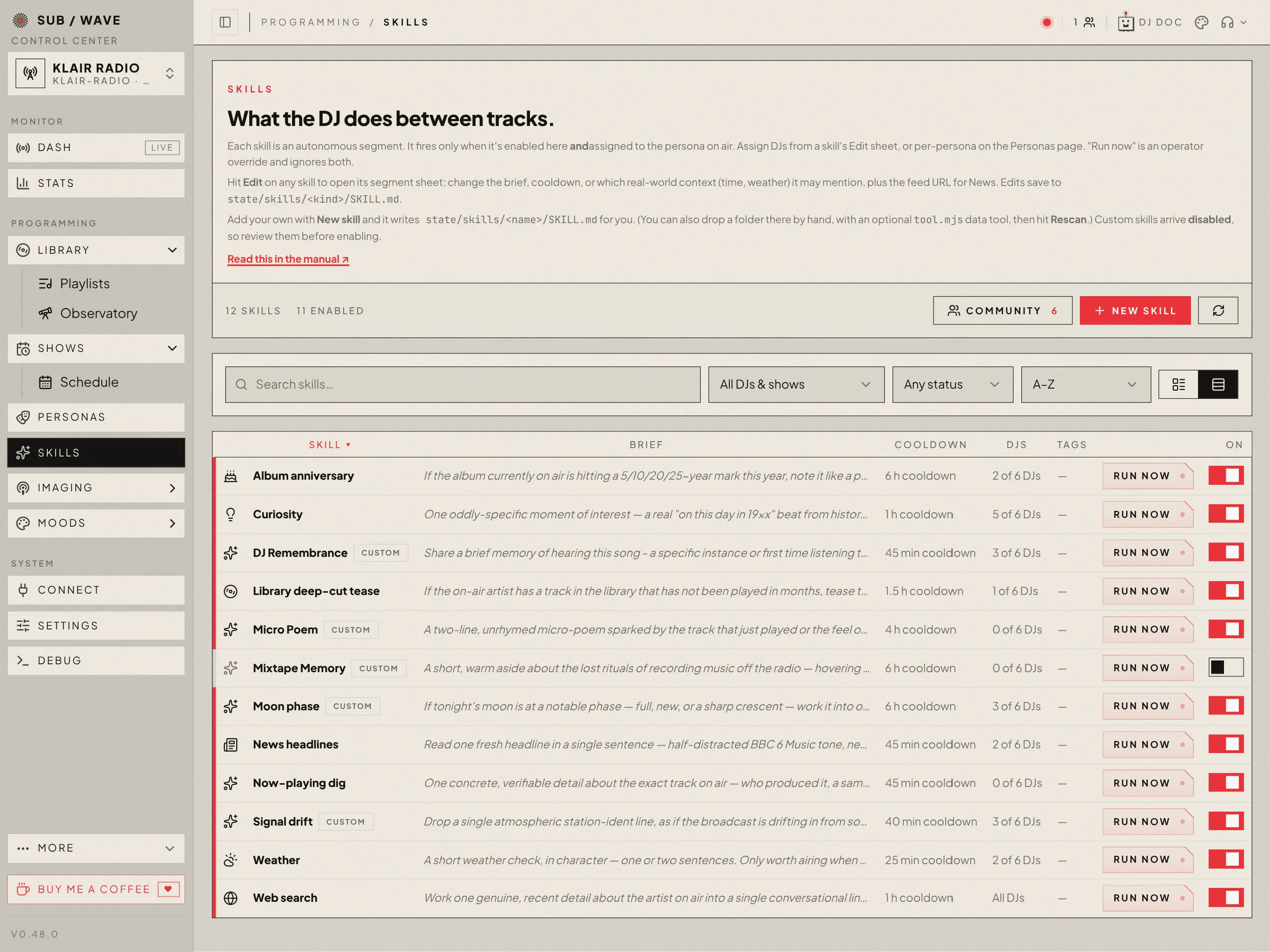
The things the DJ does between tracks (a weather check, a headline, a dig on the song playing) are skills. Seven ship built in, and you can edit any of them or add your own, from the admin Skills page or by dropping a folder into state/skills, with no code changes to the station.
WHAT A SKILL IS
One thing: a between-track line.
A SUB/WAVE skill is a single between-track spoken segment: the DJ glances at something, then either says one short line over the music or stays quiet. The format borrows from Anthropic’s skills (a SKILL.mdwith YAML frontmatter and a markdown body, plus optional code), but the meaning is narrower. These don’t process documents or run tasks; they decide what the DJ says next.
THE LAYOUT
A folder under state/skills.
Drop a folder into state/skills/. It needs a SKILL.md; an optional tool.mjs lets the segment look at live data before the DJ speaks.
state/skills/
moon-phase/
SKILL.md # frontmatter (→ settings) + body (→ the DJ's brief)
tool.mjs # OPTIONAL: a data fetcher the DJ can callTwo ready-to-copy examples ship in the repo under docs/examples/skills/: moon-phase is the small end (no settings, no network, it works the lunar phase out from the date), and sunset has operator settings, calls a public API and remembers what it already said. Copy a folder into state/skills/ and hit Rescan on the admin Skills page.
Prefer not to touch disk? The admin Skills page has a New skill button that writes the SKILL.mdfor you, and lets you edit or delete custom skills in place. It’s prompt-only (frontmatter plus the brief); a tool.mjs data fetcher is still added on disk + Rescan.
SKILL.md
Frontmatter, then the brief.
The frontmatter sets the skill’s metadata; the markdown body is the brief the DJ follows: what to say, in what tone, and when to stay silent. Only a non-empty body is required; every key has a sensible default.
---
name: moon-phase # the slug (defaults to the folder name)
label: Moon phase # label shown in admin (defaults to a title-cased name)
cooldown: 6h # min gap between auto firings — "90m" | "6h" | "2d" | "45" (minutes)
cron: 0 8 * * * # OPTIONAL: also fire on a fixed schedule, station time
cronOnly: true # OPTIONAL: with a cron, never fire at random too
cohosts: true # OPTIONAL: active host + guests, each in their own voice
window: any # "any" (default) | "commute" — commute hours only
context: time, festival # OPTIONAL: "right now" fields it may mention (see below)
requiresKey: SOME_API_KEY # OPTIONAL: env var the skill needs; unset → stays inert
feed: https://…/rss.xml # OPTIONAL: a feed to read before speaking (see below)
feedMaxItems: 10 # OPTIONAL: how much of it per fire (1–50, default 10)
---
If tonight's moon is at a notable phase, work it into one short, in-character
line, the way a late-night presenter might glance out the window. Skip it when
the phase is unremarkable.For a new skill the namemust be a lowercase slug that isn’t a built-in kind; naming a folder after a built-inedits that one instead (see below). Bad frontmatter is logged and skipped, and never crashes the station.
context:is an allow-list of the “right now” fields the DJ may weave in: date, clock, time, weather, festival, show, listeners. Leave it off and the skill gets everything exceptweather, which stays with the dedicated weather skill so the DJ doesn’t staple the forecast to every break. Tick it back on (in the frontmatter, or per-field on the admin Edit sheet) where it’s genuinely topical.
FEEDS WITHOUT CODE
A feed: line is a fetch.
Give any skill a feed: URL — in the frontmatter, or as Feed URLon its Edit sheet — and the DJ fetches it before writing the line. The items arrive as that segment’s source data, and the skill gets its own skill_<name> tool. No tool.mjs needed; News works exactly this way.
---
name: giveaway
label: Giveaway watch
cooldown: 30m
feed: https://contest.example.com/state.rss
feedMaxItems: 10
---
The feed is the current state of the contest — report on who is already in it
rather than inventing a new name. Say nothing if it is empty.- RSS 2.0, Atom and RDF all parse, namespaced tags and CDATA included.
feedMaxItems(1–50, default 10) caps how much of the feed is read per fire.- Items are burned on read: at most six fresh ones reach a segment, and the next fire offers the ones after them rather than repeating.
- A fetch that fails or times out stands the segment down rather than letting the DJ invent one.
Only an http or https URL creates the tool — anything else is logged as a warning naming the skill, so a feed: line never quietly does nothing. A skill that ships its own tool.mjs keeps it; the generated tool fills a gap, it never displaces a fetcher you wrote.
CO-HOSTED DISCUSSIONS
One roster, one real voice per person.
Set cohosts: true, or turn on Co-hosted discussionin the skill editor. The skill then uses the active scheduled show's host plus every guest co-host — the show roster is the authority, not a persona list stored in the skill. It produces exactly one contribution per person, in roster order, with 2–5 short sentences each.
Speaker names do not belong in the spoken text. Each contribution carries the persona id separately, so it is rendered in that persona's own TTS voice and attributed to them in the booth and session memory. The whole exchange is rendered before the first line airs, then played back-to-back rather than mixed.
On a solo or off-show hour the skill stands down; Run now reports that it requires a co-hosted show before any model or TTS call. If it has a data tool, that data must come back usable — gathered by the skill's own tool loop, or fetched in code when the picker agent is off — or the whole discussion stays silent instead of inventing facts.
EDITING THE BUILT-INS
The shipped skills are files too.
The seven built-ins (weather, news, now-playing digs, curiosity, album anniversaries, library deep-cuts, and web search) ship as read-only templates under controller/src/skills/builtins/<kind>/, and the first time the station boots both their SKILL.md and their tool.mjs are seeded into state/skills/<kind>/. From then on they’re ordinary editable skills: change the brief, cooldown, context, or label on the admin Skills page, and edit the tool.mjs on disk + Rescan, exactly as you would for a skill you wrote. The seeder never overwrites a file that already exists, so your edits survive restarts and upgrades.
A built-in still differs from a skill you add in three ways: it’s enabled by default, it can be disabled but not deleted (delete its folder and the seeder restores it on the next boot), and its edit sheet has a ↺ Reset to defaultthat overwrites both files from the shipped template: the way back from a broken edit, and the way to pull in a newer image’s tool.mjs.
The big one: News reads the BBC by default. Hit Editon the News skill, paste your own feed URL and rewrite the brief in your station’s voice, then Save. It’s live on the next break, no restart. News is an ordinary feed skill — the same feed: line any skill can carry.
---
name: news
label: News headlines
cooldown: 45m
feed: https://feeds.npr.org/1001/rss.xml # RSS, Atom or RDF
feedMaxItems: 10
---
One fresh headline in a single sentence — in the station's voice,
not a newsreader's. Skip anything dull or stale; silence is fine.The NEWS_FEED_URL environment variable only seeds this file on the very first boot — after that the file (or the admin form) wins.
tool.mjs — OPTIONAL
Let the DJ look before it speaks.
With a tool.mjs, the DJ can fetch live data before deciding whether to air the line — the exact same mechanism the built-ins use (they’re directories with a tool.mjs too). Export a default function; return any JSON, and use { available: false }to tell the DJ there’s nothing worth airing. The 3rd arg, services, is the station facade (searchWeb, library, nowPlaying, recentPlays, onThisDay, fetchHeadlines, durable recall), so a custom skill can reach as far as a built-in.
export default async function (ctx, state, services, config, input) {
// ctx — the moment: { time, weather, festival, dominantMood, clock }
// state — cross-tick memory (persists between firings)
// services — the station facade (searchWeb, library, nowPlaying, onThisDay…)
// config — this skill's own SKILL.md frontmatter
// input — the agent's values for your declared inputs ({} if none)
const artist = services.nowPlaying()?.artist;
if (!artist) return { available: false };
return { available: true, artist };
}
// OPTIONAL: gate the skill on a runtime condition (e.g. a search provider).
export const ready = (services) => services.searchReady();
// OPTIONAL: agent-steerable string params — the agent may pass a value or
// null for each; without this the tool is zero-arg (best for small models).
export const inputs = { query: 'what to search for; null for the default dig' };
// OPTIONAL: operator knobs — each one becomes a field in this skill's edit
// sheet. Values are saved to this skill's own SKILL.md and arrive as `config`.
export const configFields = {
endpoint: { type: 'url', label: 'Status API' },
maxRows: { type: 'number', label: 'Rows to read', min: 1, max: 50, integer: true },
};A FEED NEEDS NO TOOL
For an RSS/Atom feed you don’t need any of this — a feed: line does it (see Feeds without code above). Write a tool.mjswhen the skill needs something a feed can’t give it: an authenticated API, the music library, the play log.
The call is timeout-guarded and any error degrades cleanly to “no data”; a slow or broken skill can never hang the station. With neither a tool.mjs nor a feed:, the skill writes from its brief alone — no live data to look at.
configFields is how a skill gets its own settings without anyone touching the controller: text, url or number, up to eight of them. Because they’re declared in the code rather than keyed to the skill’s name, a copyof a skill keeps its settings: that’s what makes a second news source, on a second feed, a matter of export → rename → import.
IT RUNS YOUR CODE
tool.mjsexecutes inside the controller, the same trust model as installing a local tool. Only drop in code you’ve read and trust.
SHARING
Send one out, pull one in.
Wrote a skill worth passing on? On the admin Skills page, any prompt-only skill (no tool.mjs) grows a Share to communitybutton. It opens a prefilled GitHub issue; a workflow checks the slug and frontmatter and opens a one-file PR. Once that’s merged the skill ships in the next controller image, so any station can pick it up — with your GitHub handle and the dates stamped on it (the Community list shows “by @who · added · updated” under each entry).
The other direction is the Community button next to New skill. It lists the shipped catalog; Install drops a copy into state/skills/— toggled off, for you to read before it airs. The catalog is prompt-only by design, so installing from it never runs anyone else’s code.
ZIP EXPORT / IMPORT
Hand a skill straight to another operator.
To pass a skill directly instead, the edit sheet has an ↓ Export that streams a .zip (the SKILL.md, plus tool.mjs if it has one). The Community modal has the matching Import .zip. Like everything else, an import lands disabled.
A ZIP CAN CARRY CODE
Unlike the reviewed catalog, an imported .zip may include a tool.mjs — the same trust as dropping a folder in by hand. When it does, the UI flags it on arrival; read the code before you enable it.
GOING LIVE
Discovered, then enabled by you.
A freshly dropped skill appears on the admin Skills page toggled off. It can’t air (by itself or via the DJ) until you enable it there. Dropping a folder never puts unreviewed content (or code) on air.
Skills load at boot, and on demand via the Rescan state/skills button on that page, which picks up new folders and edits to SKILL.md / tool.mjswithout a restart. Like the built-ins, a custom skill only fires autonomously when it’s enabled and assigned to the persona on air (Personas page). Run now is an operator override that ignores the toggle, the persona, the frequency gate, and the cooldown. A co-hosted skill still requires an active host-and-guest show roster.
A cron: timer sits between the two. It ignores the frequency gate and the cooldown the way Run nowdoes, but it is not an operator pressing a button, so it still stands down when the skill is off, when the on-air DJ doesn’t run it, when the station voice is off, mid-programme, with nobody listening, or once the daily token budget is spent. Each stand-down says which of those it was in the booth log.
Worth knowing before you add one: a cron always speaks. The ordinary between-track tick lets the DJ decide there’s nothing worth saying, and it often does. A cron takes the forced path instead, where staying silent isn’t on offer. Good for a fixed daily moment; poor for a skill written to speak only when something is notable.
Full reference, including the example skill, lives in docs/custom-skills.md.